Virtualization Platforms (VMware, KVM, Proxmox, OpenStack)
We run virtualization platforms and engineer migrations between them: cluster management, resource planning and migration projects across VMware, KVM and Proxmox.
What we deliver
Day-to-day operation of VMware, KVM and Proxmox clusters: node health, resource distribution, high availability settings and live migration policies.
Overcommit ratios set by measurement, CPU and memory reservations tuned to the workload, and noisy neighbor effects contained.
For moves from VMware to KVM or Proxmox: dependency inventory, compatibility analysis, a phased plan, and a way back kept open at every stage.
Standardized virtual machine templates and an enforced snapshot retention policy, so accumulated snapshots do not drag down performance.
We track the license model and renewal calendar, so you see the cost impact in advance and can assess alternatives on schedule rather than under pressure.
Automatic failover configured for node failure, recovery scenarios verified in drills, and measured recovery time reported.
How it works
Every engagement follows the same five steps: baseline the current state, design the target model, roll out in stages, operate it, and improve against measurements.
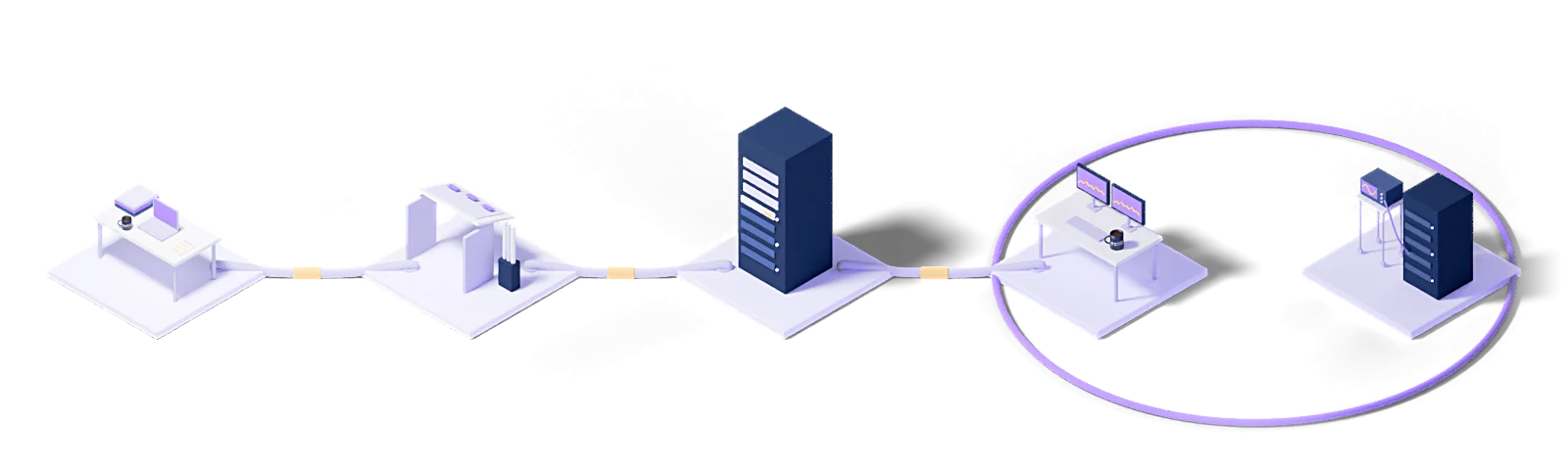
Assess
Baseline the current state, name the gaps and put the success criteria in writing.
Design
Architect the target operating model and the toolchain it needs.
Deploy
Implement, configure and validate in a staged rollout.
Operate
24/7 management with contracted response times and proactive monitoring.
Improve
Continuous improvement driven by metrics, incidents and changes in the business.
Every engagement runs under a written SLA: a commitment, not a best-effort promise.
Dedicated engineers who know your stack. No generalist help-desk tier in between.
Service reviews every two weeks, roadmap updates every quarter.
Who uses this
The industries we run Virtualization Platforms (VMware, KVM, Proxmox, OpenStack) for.
The technologies we run this on
The concepts behind this service
- CPU
- Central processing unit — the component that executes instructions.
- Hypervisor
- The layer that lets several virtual machines run on one physical server.
- Mixed workload
- Applications with different workload profiles sharing the same infrastructure.
- Virtual server
- A server with its own operating system running on physical hardware through a hypervisor.
- Virtualization
- Abstracting physical resources in software and presenting them as several logical ones.
- Virtual machine (VM)
- A software-created equivalent of a physical computer, running its own operating system.
This section explains the technical terms used on this page. The definitions come from Eclit's own technology glossary, and each term links through to its full entry there.
The full technology glossary →Knowledge Hub
What we have written about running and managing technology, collected in one place.
What Is a Virtual Machine (VM)? Virtual vs Physical Servers
7 min readWhat Is a Private Cloud? How It Differs from Public Cloud
6 min readVMware Licensing Changed: Should We Move to Proxmox?
5 min read10 Questions to Ask When Choosing a Managed Service Provider
5 min readHow to Run a Disaster Recovery Failover Test That Proves Something
4 min readWhat Is Hyperconverged Infrastructure (HCI)?
8 min read01VMware license costs have gone up. Should we move to an alternative?
The decision rests on three measurements: current renewal cost, the project cost of migrating, and the cost of operating the new platform. KVM and Proxmox are realistic alternatives for many workloads, but moving everything is not always the cheapest path; a mixed environment is also an option. We do the measurement and put the numbers in front of you.
02How does a migration from VMware to KVM or Proxmox proceed?
It starts with a dependency inventory: which virtual machine talks to which, and what drivers and agents are installed. Then compatibility analysis, a phased migration plan, and a rollback plan written for each phase. The migration runs in waves, with verification after each one.
03How do you set the overcommit ratio?
By measurement. CPU ready time, memory ballooning and swap activity are monitored, and the ratio is set at the highest point where none of the three crosses its threshold. There is no one-size-fits-all ratio; it depends on the workload profile.
04Why do snapshots accumulate and cause problems?
A snapshot holds changes in a separate chain; as the chain grows, disk performance falls and consolidation takes longer. A retention policy is defined and expired snapshots are cleared on a schedule.
05What happens when a node fails?
Where high availability is configured, the virtual machines restart automatically on the remaining nodes. The scenario is proven in a drill and the measured recovery time is reported; resource reservation is planned so the surviving nodes can carry the load when one node is lost.
Let's work out where to start
Within two weeks you get it in writing: what works, what carries risk, and a prioritized roadmap.
Request a conversation