Cloud Platforms: Public, Private and Hybrid
We architect and operate high-performance landing zones across public, private, and hybrid cloud environments. On AWS, Azure, Google Cloud or our dedicated Eclit Cloud infrastructure, we keep your platforms optimized for cost, security and global scale, with consistent operational governance.
What we deliver
Automated deployment of multi-account governance frameworks using Control Tower, Azure Blueprints, or Terraform Enterprise so security baselines are enforced from day one.
Continuous analysis of cloud spend, right-sizing recommendations, and savings plan management to cut waste and get more value from your infrastructure investment.
Unified management of on-premises workloads and public cloud services, so every environment can be seen and controlled from one place.
Declarative infrastructure management using Terraform and Pulumi. Every resource is version-controlled, reviewed, and deployed through automated CI/CD pipelines.
Performance tuning for compute (EC2/EKS), storage (EBS/S3) and database clusters so they handle unpredictable traffic spikes without slowing down.
Automated cross-region replication, snapshot management, and disaster recovery orchestration to keep the business running through a cloud provider outage.
How it works
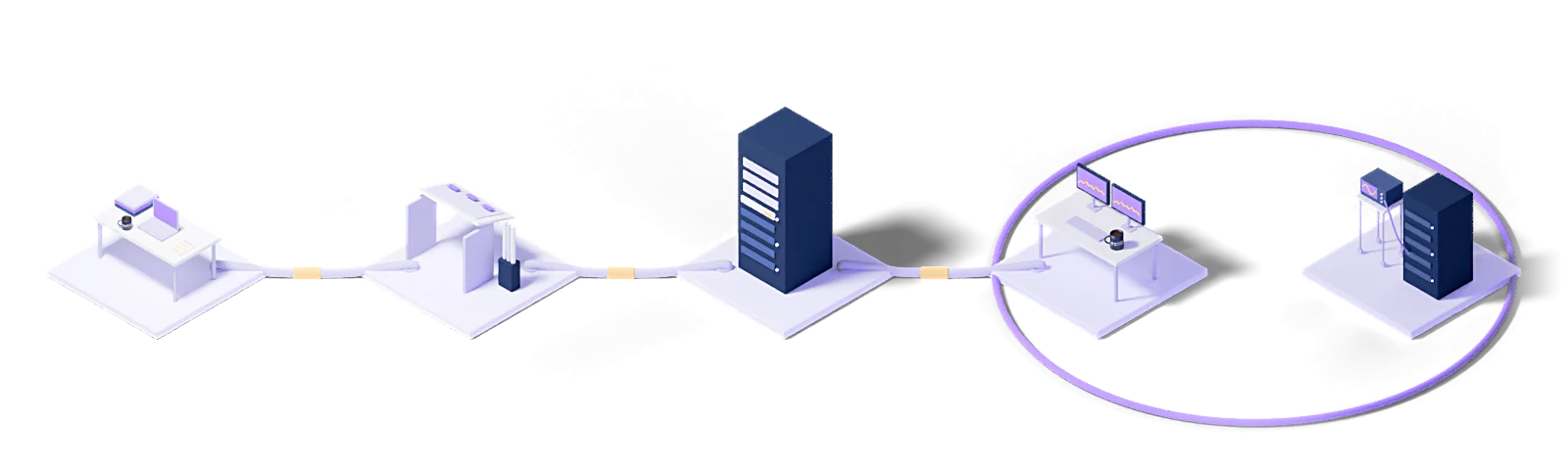
Every engagement follows the same five steps: baseline the current state, design the target model, roll out in stages, operate it, and improve against measurements.
Assess
Baseline the current state, name the gaps and put the success criteria in writing.
Design
Architect the target operating model and the toolchain it needs.
Deploy
Implement, configure and validate in a staged rollout.
Operate
24/7 management with contracted response times and proactive monitoring.
Improve
Continuous improvement driven by metrics, incidents and changes in the business.
Every engagement runs under a written SLA: a commitment, not a best-effort promise.
Dedicated engineers who know your stack. No generalist help-desk tier in between.
Service reviews every two weeks, roadmap updates every quarter.
Who uses this
The industries we run Cloud Platforms: Public, Private and Hybrid for.
The technologies we run this on
The concepts behind this service
- Autoscaling
- Automatically adding and removing resources in response to demand.
- Cloud infrastructure
- The compute, storage, network and virtualization layer that carries cloud services.
- Cloud computing
- Compute, storage and application resources delivered over the internet, on demand and paid for by consumption.
- Multi-cloud
- Using more than one cloud provider together.
- Flexi cloud
- A cloud consumption model where resources flex up and down with need, built on variable consumption rather than a fixed capacity commitment.
- Hybrid cloud
- A model combining on-premises infrastructure with cloud.
This section explains the technical terms used on this page. The definitions come from Eclit's own technology glossary, and each term links through to its full entry there.
The full technology glossary →Knowledge Hub
What we have written about running and managing technology, collected in one place.
What Is Cloud Computing? Cloud Models and Types
7 min readWhat Is a Private Cloud? How It Differs from Public Cloud
6 min readWhat Is Hybrid Cloud? When Is It the Right Choice?
6 min readWhat Is IaaS? IaaS vs PaaS vs SaaS
7 min readKVKK Cross-Border Data Transfer: What to Check When Using the Cloud
5 min readBDDK Treats Cloud as Outsourcing: What Changes for Banks
5 min readVMware Licensing Changed: Should We Move to Proxmox?
5 min readWhy Data Residency Alone Does Not Make a Sovereign Cloud
7 min readFinOps in 2026: Why 29 Percent of Cloud Spend Goes to Waste
6 min readAI Cloud Costs: FinOps Discipline for the Inference Era
6 min readWhat Are CAPEX and OPEX? The Difference in IT Spending
7 min readWhat Is a Cloud Server? How It Works and How to Choose One
10 min readWhat Is a VPC (Virtual Private Cloud)? Subnets and Security
11 min read01How do we choose between public, private and hybrid cloud?
The decision is made per workload, not per organization. On its own, "we are moving to the cloud" is an intention rather than a decision.
Three properties are examined. Demand variability: if your load swings several-fold through the day or the season, the elasticity of public cloud pays off directly; on a flat load you are paying a premium for elasticity you do not use. Data sensitivity: where the data may sit, by country and by facility, is often regulated, and where it is, the choice starts there and cost comes second. Latency tolerance: an application tightly coupled to an on-premises system pays network latency on every call once it moves.
In practice most organizations end up hybrid, but there is a wide gap between a deliberate hybrid and "we moved half and the rest stayed". In the first, every workload's location has a reason and that reason is written down.
02Does using more than one cloud provider raise costs?
Generally yes, and knowing that up front makes the decision easier.
Costs rise in three places. Egress charges: providers make data cheap to bring in and expensive to take out; if data flows constantly between two clouds this line item adds up. Two sets of expertise: each provider has its own identity model, network architecture and service names, and the team has to know both in depth. Two operating stacks: monitoring, backup, cost reporting and security policy all get built twice.
Against that, multi-cloud has two legitimate reasons: reducing vendor lock-in, particularly for negotiating position, and a regulator requiring a second provider.
The wrong reason is expecting it to be cheaper. We measure the real cost of your current spread and show it; the decision follows that number.
03Why does our cloud bill keep rising every month?
Almost always the same three causes, and all three are measurable.
Resources never switched off. An environment spun up for a test is left running when the work ends. What finds these is tagging discipline: if every resource carries an owner, an environment and an expiry, the ownerless and expired ones surface in a report.
Oversizing. Instance size is usually chosen for the worst case and never revisited. Measure actual usage and you find machines running at 10% CPU.
Forgotten disks and snapshots. Deleting a virtual machine does not delete its disk. Snapshots accumulate. Individually small on the bill, collectively large.
The first step is inventory and tagging. Cutting without knowing what something is carries risk: nobody can safely switch off a resource whose owner is unknown. Once inventory is in place, a meaningful drop usually shows in the first three months.
04Do you manage reserved capacity and savings plans?
We do the analysis and the tracking; the purchasing decision stays with you.
A reservation means committing to a given capacity for one or three years in exchange for a substantial discount. The savings are large, but the commitment cannot be undone: a miscalculated reservation means paying for unused capacity for three years.
The analysis therefore rests on usage history: which workload genuinely runs continuously, which is seasonal, which is being retired next year. Only the first group is proposed for commitment.
Tracking is part of the work too: commitment end dates are monitored. A reservation that quietly expires means the bill jumping unexpectedly within a month, and that does happen where nobody is watching.
05Can you take over management of our existing cloud accounts?
Yes, and a takeover always begins with an inventory.
The first question is "which accounts exist", and in most organizations the answer is longer than expected: accounts opened for a project and then forgotten, subscriptions someone opened on a personal card, environments inherited from an acquisition.
The second is "who holds permissions". Departed employees with live access, shared administrator accounts and keys that never expire all surface here.
The third is "what does each resource serve". Operational handover does not happen before this is established: nobody can safely switch off a resource whose owner is unknown, and a resource that cannot be switched off stays on the bill forever.
Once the inventory exists, handover is phased: monitoring and reporting first, then routine operations, and change authority last.
06Is moving to the cloud always the right call?
No, and be wary of a provider who says otherwise.
Some workloads do not pay back the cost of moving. Flat, predictable, resource-hungry workloads (large databases, continuously running compute jobs) often run more cheaply on your own hardware. Fully depreciated hardware costs little beyond power and maintenance, while the same capacity in the cloud is charged at full price every month.
Second case: applications tightly coupled to an on-premises system. Put the application in the cloud with the database still on-premises and every query crosses the network.
Third: legacy applications that will not change. Moving them to the cloud does not modernize them; it just runs them on someone else's hardware.
The better question is: where does each workload belong?
07What if we have a data residency requirement?
The choice starts there and every other decision follows from it.
First, we pin down exactly what the requirement means, because "the data stays in Türkiye" is not enough on its own. Production data, or backups too? Do log and telemetry data count? Does an engineer seeing the data on screen during support count as a transfer?
Once those are answered the options narrow: a public cloud provider with an in-country region, an in-country private cloud, or a combination.
The configuration itself is then locked: the region restriction is defined as policy, so resources cannot be created in the wrong region. Without that lock, a correctly built environment can be broken six months later by one resource someone created in a hurry.
08Isn't cloud security the provider's responsibility?
Part of it is, and not knowing which part is the source of the most common security gap.
Providers describe this as the shared responsibility model. The provider is responsible for physical security, the hypervisor and the infrastructure layer. You are responsible for the operating system, the application, identity and access management, network configuration, and the data itself.
In practice the large majority of breaches happen not in the provider's layer but in the customer's: a storage bucket left public, a role granted far too many permissions, an unpatched server, a key committed to source control.
So being in the cloud does not make you secure. The cloud provides the tools you need, but it will not close a door you left open.
09Will there be downtime during migration?
There is planned downtime; the aim is to have no unplanned downtime.
It depends on the method. With continuous replication the data synchronizes in the background for weeks and the final cutover takes minutes, usually within a weekend window. With a one-off copy the outage depends on data volume and can run to hours.
The length depends more on dependencies than on data: what the application will connect to once moved, when DNS changes, what the rollback plan is. Where these are not written down in advance, a "two-hour window" stretches past midnight.
Every migration has a rollback point: if verification is not complete by a set time, you return to the old environment. The threshold for that decision is written in advance, not argued over on migration night.
Let's work out where to start
Within two weeks you get it in writing: what works, what carries risk, and a prioritized roadmap.
Request a conversation