Backup, Replication & Recovery
Managed backup as a service (BaaS): backup, replication and restore run as one operation. The measure is not how many backups exist but which point you can return to: every protection policy is tied to an RPO target and proven by regular restore testing.
What we deliver
Not every system is backed up at the same frequency. A critical database is protected with log backups measured in minutes, a file server with a daily full. The tiering sets both the cost and the recovery time.
Write-once retention on the backup repository closes the layer ransomware targets most. Until retention expires, no administrator account can delete that data.
A backup job reporting success does not mean the data will come back. We periodically run a real restore from a randomly chosen backup and measure how long it takes.
Three copies, two media types, one offsite: the baseline. In the ransomware era an offline or immutable copy is added to it.
Tax law, KVKK/GDPR and industry regulations impose different retention periods. The policy is derived from the legal requirement, not from technical convenience.
A backup that fails quietly is worse than one never taken. Failures raise alerts, and a new server left outside the scope shows up in the report.
How it works
Every engagement follows the same five steps: baseline the current state, design the target model, roll out in stages, operate it, and improve against measurements.
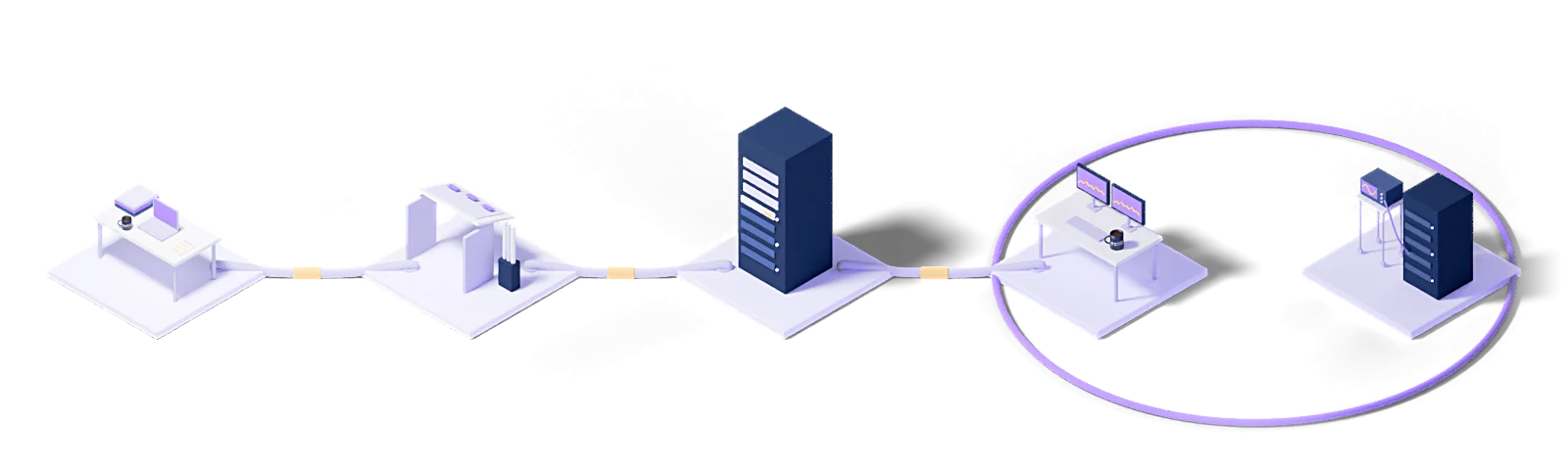
Assess
Baseline the current state, name the gaps and put the success criteria in writing.
Design
Architect the target operating model and the toolchain it needs.
Deploy
Implement, configure and validate in a staged rollout.
Operate
24/7 management with contracted response times and proactive monitoring.
Improve
Continuous improvement driven by metrics, incidents and changes in the business.
Every engagement runs under a written SLA: a commitment, not a best-effort promise.
Dedicated engineers who know your stack. No generalist help-desk tier in between.
Service reviews every two weeks, roadmap updates every quarter.
Who uses this
The industries we run Backup, Replication & Recovery for.
Plant systems local, management central, redundancy planned line by line.
Explore →Finance and insuranceSeparation of duties, immutable backups and audit reports from a single place.
Explore →Healthcare and pharmaPatient data held encrypted, with every access recorded.
Explore →The technologies we run this on
The concepts behind this service
- Backup-as-a-Service (BaaS)
- Backup delivered as a service.
- Backup
- Keeping a separate copy of data against loss or corruption.
This section explains the technical terms used on this page. The definitions come from Eclit's own technology glossary, and each term links through to its full entry there.
The full technology glossary →Knowledge Hub
What we have written about running and managing technology, collected in one place.
What Is Backup? Backup Types and the 3-2-1 Rule
8 min readWhat Is Object Storage? How It Differs from Block and File Storage
7 min readYou Have Backups, but Can You Recover? Veeam, Zerto and the Recovery Gap
3 min readZerto vs Veeam: A Practical Comparison with Real Strengths and Weaknesses
5 min readHow to Calculate RPO and RTO Without Guessing
4 min readGetting Started with Veeam: Your First Backup Job Done Properly
4 min readGetting Started with Zerto: Your First Virtual Protection Group
5 min readHow to Learn Veeam and Zerto: Certification Paths and a Realistic Study Plan
4 min readWhat Is Disaster Recovery? How to Build a DR Plan
8 min readWhat Is a Disaster Recovery Site (FKM)? How to Build One and Who Must Have It
9 min readWhat Is Ransomware? How Attacks Work and How to Prevent Them
9 min readWhat Is NAS? Network Attached Storage vs SAN
9 min readWhat Is RAID? RAID 0, 1, 5, 6 and 10 Explained
9 min readWhat Is DRaaS? How Disaster Recovery as a Service Works
10 min readWhat Is Backup as a Service (BaaS)? How Cloud Backup Works
10 min read01What is Backup as a Service (BaaS), and what is included when you hand backup over?
Backup as a Service (BaaS) is a managed backup model in which a service provider runs backup, replication and restore as one operation. At Eclit, every system's protection policy is tied to an RPO target, the backup repository is protected by immutable retention, and a real restore from a randomly chosen backup is run regularly and timed. A failed backup job raises an alert, and a new server left outside the scope shows up in the report. The storage location is decided with you and written into the contract; if you have a data residency requirement, backups stay in data centers in Türkiye. We also work with your existing Veeam, Commvault, NetWorker or Rubrik setup.
02How do you set our RPO and RTO targets?
We start with a business impact analysis; targets come from what the business needs, not from what a product can do.
The analysis asks two questions: how long can this system be down (RTO), and how much data loss is acceptable (RPO). The questions go to the business unit that uses the system, not to the technical team, because both answers are commercial.
The resulting targets are set per system, and tiering is essential here: the platform that takes payments and the internal reporting tool do not need the same target. Holding everything to the most aggressive target spends most of the budget on low-priority workloads.
Once the targets are set, the method follows: a daily RPO is met with periodic backup, an hourly RPO with frequent snapshots or log-based recovery, a minute-level RPO with replication. Each step costs differently, and the decision is made with that cost visible.
03How do you prove the backups can actually be restored?
With regular recovery drills. The fact that a backup was taken does not mean it can be restored.
A backup job can report success and still be broken: a missing database file, an inconsistent snapshot, a configuration file needed at recovery but never backed up. These only become visible when you try to restore.
In a drill, we actually restore into an isolated environment: the data loads, the application starts, integrity is checked, elapsed time is measured. The measured time is compared with the target and the gap goes into the report.
The report stays with you and serves two purposes: it is your audit evidence that recovery has been tested, and it sets the agenda for the next drill. Over time, the reports also show a trend: if recovery time is getting longer, the environment is drifting away from the plan.
04How are backups protected against ransomware?
Two mechanisms work together, and neither is sufficient alone.
Immutable storage. A copy that no account, including the administrator's, can delete or alter for a set period once it is written. The period is chosen to be longer than it takes to notice an attack.
Identity separation. The backup infrastructure authenticates independently of the production directory service. Without this, an administrator account compromised in production can reach the backups directly, and that is the first thing an attacker does.
Ransomware today does not encrypt the moment it lands; it sits quiet for weeks, looking for the backup infrastructure first. The recovery point is therefore chosen differently as well: not from when the attack was detected but from when the infection began. The gap between those is usually days, which means enough history has to be retained to reach a clean point.
05Where are backups stored? Do they leave the country?
The storage location is decided with you and written into the contract.
If you have a data residency requirement, backups stay in data centers in Türkiye; the location of the secondary copy is defined the same way. Where there is no such requirement, location is chosen by balancing recovery speed against cost.
There is a detail here that is often missed: besides the backup itself, the backup system's metadata (which file was backed up when, which server belongs to which job) is also stored somewhere. In some cloud-based backup products that metadata is held in the provider's central system.
Copies are also kept in at least two distinct locations: two copies in the same facility count as one if something happens to that facility.
06Do you work with our existing backup product?
Yes. We work with Veeam, Commvault, NetWorker, Rubrik and the native hypervisor tools.
We only propose changing products if the current one cannot meet your targets, and then we explain why. Replacing a backup product involves more than new software: the old product has to stay running for as long as its backups are retained, which means operating two systems in parallel for a period. When that cost is not accounted for up front, the migration turns out more expensive than expected.
When we take over, we first establish what the current setup actually does: which jobs run at what frequency, which systems have fallen out of scope, what the retention periods are. Finding a system that has dropped out of scope is something we encounter in almost every takeover.
07Is the 3-2-1 rule still valid?
At its core, yes, but it falls short in the ransomware era.
The classic rule says: three copies of the data, on two different media, one of them offsite. It was designed for hardware failure and physical disasters. Against those two risks it still holds.
Where it falls short is when an attacker can reach all of the copies. If all three are reachable from the same network and authorized by the same identity system, then as far as the attacker is concerned there is one copy.
So the rule is usually extended: one of the copies must be immutable, and one must be offline or logically separated. Three copies, two media, one offsite, one immutable, zero unverified restores.
The last clause is the most frequently skipped: an unverified backup is a copy that does not count.
08Does backup slow production down?
If badly configured, yes, and it is usually a window problem.
Backup means reading from disk and sending over the network, and both use the same resources as the production workload. The impact is felt when the backup window spills into business hours, or when the data volume grows beyond what the window can hold.
The order of fixes: incremental backup first, so each run copies changed blocks rather than a full image. Then snapshot-based methods, where copying happens from an image while production continues. Then bandwidth throttling, capping backup traffic. Last, if genuinely needed, a separate backup network.
The number to watch is backup duration as a share of the window rather than raw duration. Once it passes 80%, treat it as a warning: data keeps growing and the window will overflow within months.
09How long should we retain backups?
Retention has to meet three separate requirements at once, and the longest one sets the period.
Operational need: restoring a file deleted by accident usually needs a few weeks of history. How long it takes to notice a deletion sets this.
Ransomware need: reaching back to the start of an infection needs longer history, because detection comes weeks later.
Legal and contractual need: the retention period set by regulation or by customer contracts. This is usually the longest and the least negotiable.
These combine into a single retention policy: daily backups for a short period, weekly and monthly copies longer, annual archives longest. This is called tiered retention, and it is what keeps cost under control: keeping every daily backup for seven years is both unnecessary and expensive.
Retention has a flip side too: personal data held longer than required under KVKK becomes a finding in itself.
10How long does a restore take?
It depends on method and preparation rather than data volume, and that distinction explains why most estimates do not hold.
In a classic restore the data is copied over the network to the target system; the time depends directly on volume and bandwidth. At terabyte scale that means hours.
With instant recovery the virtual machine is started directly from the backup repository and the data moves in the background. The system is up within minutes and runs at reduced performance for a while. This is the method of choice for critical systems.
But the time is usually set by preparation rather than copying: the target environment existing, the network being ready, knowing who approves what and when. Without that preparation a "two-hour recovery" actually takes half a day, and only a drill shows you that gap.
Let's work out where to start
Within two weeks you get it in writing: what works, what carries risk, and a prioritized roadmap.
Request a conversation